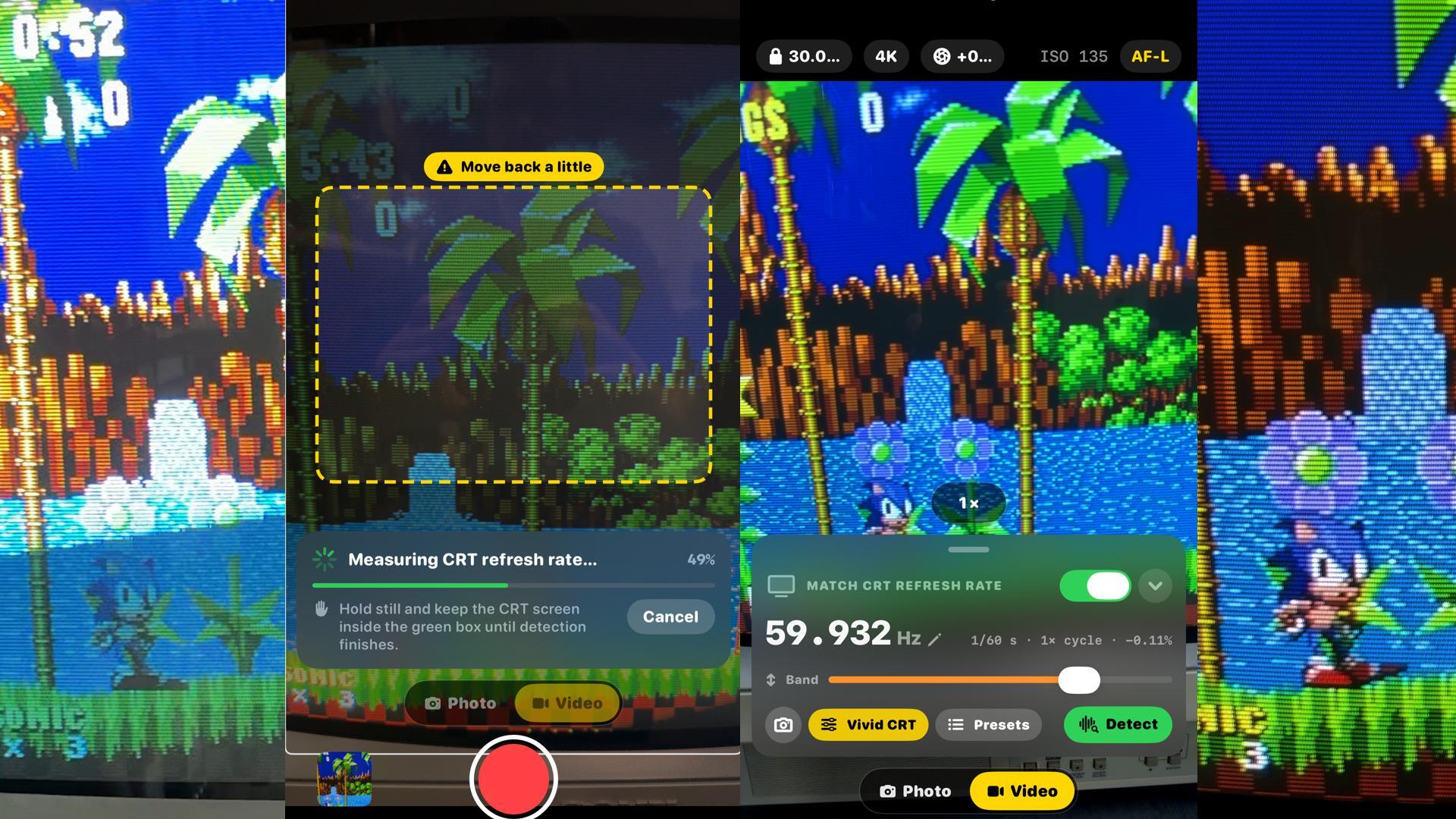
Recording a classic game on a CRT can be a fiddly business. The picture may look steady to your eyes, yet a phone camera can show a dark bar rolling across the screen or capture a pattern that was hard to see in person. Action Retro’s CRT Sync is an iOS photo and video app made to help with that particular mismatch: it is designed to sync the camera with the refresh rate of an old CRT display.
Retro Context
Old consoles and CRT televisions are a familiar pairing, but filming that setup is not as simple as pointing a camera at it. The screen refreshes repeatedly, and the camera has its own timing. If those timings do not line up, the recorded image can show unwanted bands or other visual interference. For anyone documenting a console on its original display, the screen itself is part of the picture, so losing detail while trying to hide those effects can be frustrating.
CRT Sync offers preset settings for common CRTs, along with an automatic detection option. The example shared with the app shows a Genesis image recorded at the NTSC standard of 59.94 Hz. When automatic detection was used, the app adjusted the setting to 59.932. That small change is the point: a standard value can be a useful starting place, while a particular screen may appear to work better at a slightly different rate.
The detection feature is the app’s most distinctive idea. Rather than asking the user to settle on a rate by hand, it can look for a setting that syncs well with the display. In the demonstrated case, the result appeared to work well. That is a practical convenience for people who would rather spend their time recording or playing than repeatedly adjusting camera controls.
Why It Matters
The app addresses one specific part of CRT capture, and the example gives retro players a concrete reason to try it: even a familiar NTSC setting may not be the best match for every recording setup. Presets can help users get started, while detection may save some trial and error. This could be useful for documenting gameplay, sharing footage, or simply keeping a record of a console running on its original screen.
There are still limits to what sync can solve. Capturing the CRT’s mask and fine image detail is difficult in its own right. Defocusing the camera can reduce colour and moiré problems, but it can also soften the details a viewer may want to preserve. Matching refresh rates may help with rolling bars, but it cannot make every challenge of photographing a CRT disappear. Results can depend on the display and on the camera setup, so the app is best understood as a useful tool rather than a guarantee of perfect footage.
Z-retro View
CRT Sync takes aim at an old, familiar nuisance with a feature that feels well suited to retro capture: automatic refresh-rate detection. The Genesis example suggests why that option could matter, while the broader trade-offs around focus and image detail remain part of the job. For collectors, players, and video makers who regularly film CRTs, presets and detection offer a straightforward place to begin; occasional users may still prefer to experiment with the camera settings they already have.
Action Retro is selling CRT Sync for iOS, with a purchase page and project site available online. Action Retro also shared a download code for the full version in a post dated November 26, 2026; the source does not establish how long that code is available. For anyone curious about filming a Genesis or another classic setup, the app’s automatic detection is the feature to look at first, with the understanding that careful framing and focus still matter.