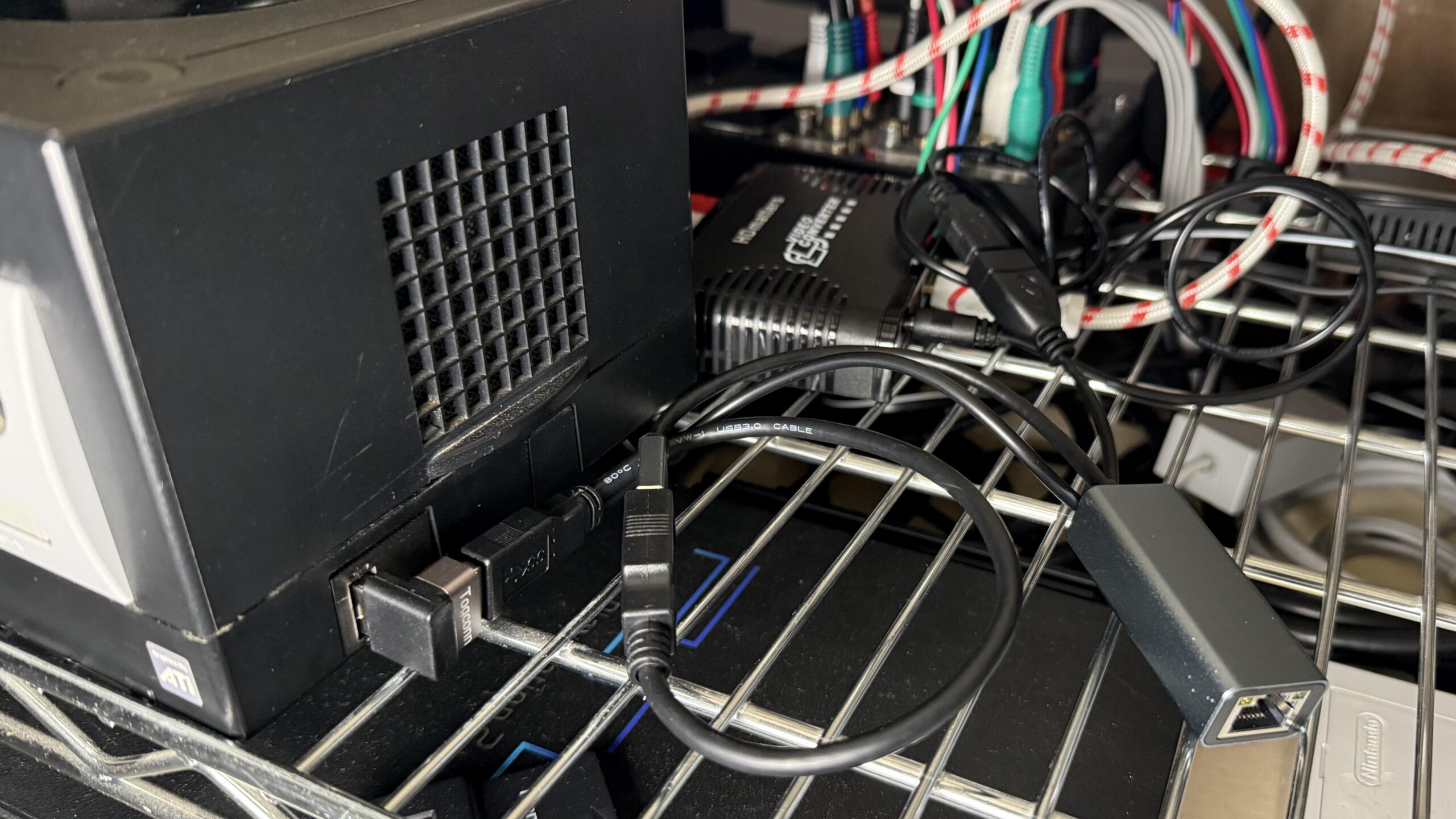
A GameCube can fit neatly into a CRT setup without relying on the costly original component cable. This arrangement sends the console’s picture through an HDMI adapter and a small converter, while a USB network adapter stays connected. The unusual part is how one splitter handles both data and power, letting the whole chain work when the GameCube turns on.
Retro Context
This setup belongs to an “HD CRT cart” built for consoles that output 480i and above, with most use focused on 480p. The consoles feed a component video auto-switch, which routes the selected picture to the CRT. That kind of setup brings together different generations of video connections, so an option that can bridge HDMI to component video is useful when adding a console without changing the display or the rest of the switching arrangement.
For the GameCube, the video path starts with a Carby HDMI adapter. Its output goes into an HDMI-to-YPbPr DAC, which converts the signal to component video for the auto-switch. The original GameCube component cable was considered too expensive for this setup, so a less costly converter offered another route. The DAC worked well, but it needed power from an external source.
That power requirement created a small but important snag. Leaving the DAC plugged into AC meant the component switch could detect its output all the time, even when the GameCube was off. The goal was for the switch to respond to the console as part of the normal setup, so powering the converter independently was inconvenient. Supplying its power from the GameCube’s USB connection made the behavior line up with the console’s own power state.
Why It Matters
The GameCube in this arrangement has a USB Dolphin installed. Using that port to power the DAC worked, but the console also needed a USB Ethernet adapter. Keeping the network connection at full speed meant the two jobs could not simply share a standard USB hub: USB Dolphin was not compatible with hubs. This is a practical reminder that adding ports does not always solve a connection problem when a mod or device has a specific compatibility limit.
A single-data, dual-power splitter solved the conflict. Its blue input passes the USB 3.0 network adapter’s data lines through to the GameCube, with no hub in the path. A separate port carries power only, and that is used to run the HDMI-to-component DAC. With the arrangement in place, the GameCube powers the converter, the network adapter can operate, and the component auto-switch works as intended.
The reported result is that the parts come on with the GameCube, rather than leaving the DAC powered and visible to the switch all the time. The setup also keeps the network adapter’s data path direct. Separate reviews of the splitter and a 90-degree adapter were cited as demonstrating true 5Gbps USB 3.0 speeds. That speed detail may matter to people choosing accessories, though the key point here is that the splitter passes data through instead of acting as a hub.
Z-retro View
This is a tidy example of how a CRT collection can grow without replacing its existing video routing. The GameCube’s HDMI adapter and DAC provide a path to component video, while the splitter addresses the less visible power and USB compatibility details. Each part has a specific role, and the result depends on the console’s USB Dolphin setup and the chosen splitter, so it is best understood as a particular solution rather than a universal GameCube recipe.
For owners building a similar setup, the useful lesson is to trace both the picture path and the power path before buying parts. A DAC may produce the right image but still affect an auto-switch if it remains powered. A hub may offer extra ports but fail with a particular mod. Here, a direct data pass-through and a separate power feed bring those requirements together in a compact, console-powered arrangement.